In short
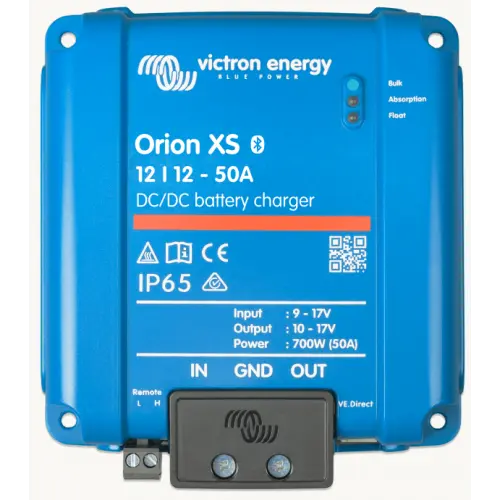
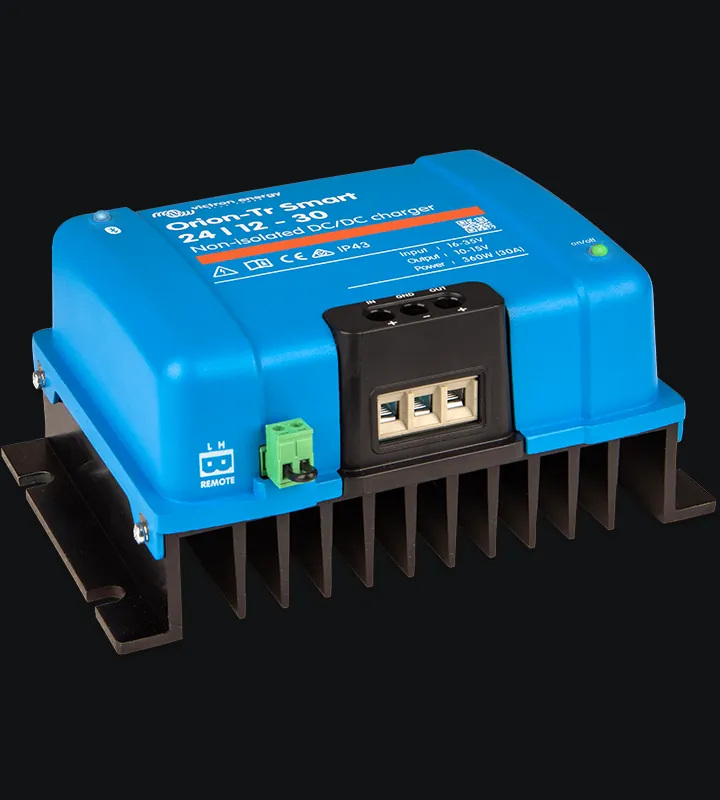
A DC-DC charger not charging is usually doing what it has been told to do. Something has switched it off, the engine detection thinks the engine has stopped, the input voltage has tripped the lock-out, or the battery is full, protected or cold. Victron’s own troubleshooting starts with the app, then the wiring, then the battery. This guide follows that order for the Victron Orion XS and Orion-Tr Smart, so you can rule out the common causes before you send a charger back.
- Start with the reason VictronConnect gives
- Check the remote loop or signal
- Smart alternators can fool engine detection
- Most error codes don’t mean a faulty unit
DC-DC charger not charging: the order we work in
Each check below matches a section of Victron’s manuals. Work down the list and stop when you find the cause.
- Read the reason in VictronConnect. The app tells you why the charger is off.
- Check the remote connector. No wire loop or remote signal means no charging.
- Check engine shutdown detection. A smart alternator can make a running engine look stopped.
- Check the input voltage lock-out. It can trip on a low alternator voltage or on cable drop.
- Check the supply, fuses and cables. Measure at the charger terminals, then look for voltage drop.
- Check the battery. A full or nearly full battery takes very little current.
- Check the BMS and the temperature. A lithium BMS or a cold battery can stop the charge on purpose.
- Check for heat. A hot charger reduces its current.
- Check the negatives around the shunt. The charger may be working while the battery monitor misses it.
- Read any error code. A few point to a faulty unit. Most don’t.
1. Start with the reason VictronConnect gives
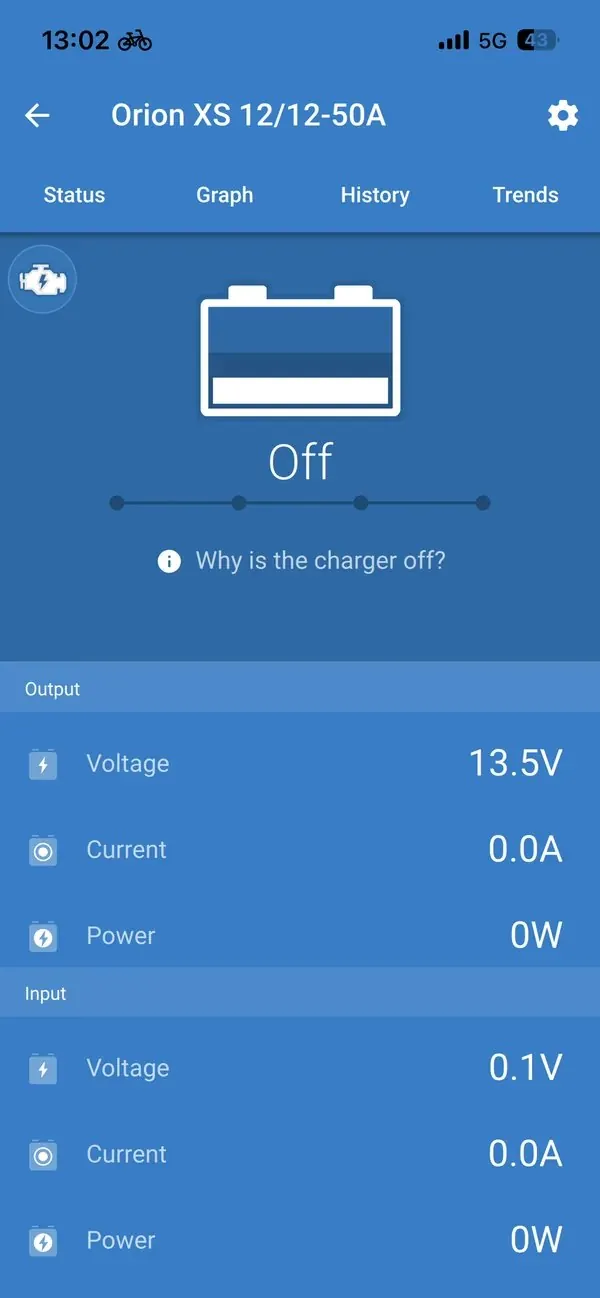
Open VictronConnect with the engine running. On an Orion XS there is a link at the bottom of the status screen that reads “Why is the charger off?”. Tap it and the app explains why charging is disabled. On an Orion-Tr Smart the reason shows in the status field at the top of the status screen. Victron tells you to check this first, and so do we.
| What the app says | What it means | Where to look next |
|---|---|---|
| Remote input inactive | The remote on/off input isn’t switched on | Section 2: the wire loop, the connector, or a BMS or switch on the remote |
| Disabled in settings | The charger has been switched off in the app | Turn the charger back on in the battery settings |
| Input voltage lock-out | The input voltage is below the lock-out level | Section 4 |
| Engine shutdown detected | The charger has decided the engine isn’t running | Section 3 |
Source: Victron, Orion-Tr Smart non-isolated manual, battery is not charged and Orion XS manual, battery not charged.
If the app shows the charger on and in bulk, absorption or float, but the current looks low, skip ahead to sections 5 to 8. If the app won’t connect at all, measure the voltage on the charger’s own terminals first (section 5).
2. The remote connector and the wire loop
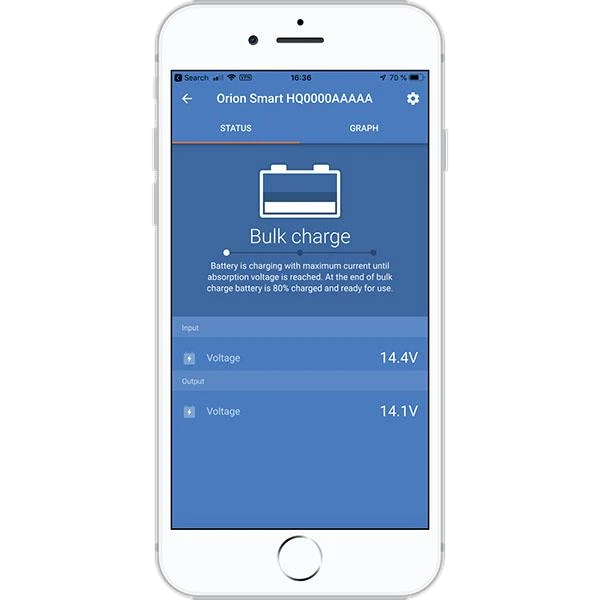
Both chargers have a two-pole remote connector with an L pin and an H pin. The charger only runs when that input is switched on. From the factory, a wire loop between L and H does that job. Victron’s checks are simple:
- Is the connector there, and pushed fully home?
- Is the wire loop, or the switch wired in its place, making good contact?
- Is something else controlling it? On many lithium systems a BMS, a switch or a relay drives the remote instead of the loop. In that case check that device and its wiring.
The Orion-Tr Smart manual adds a useful test. If you’re not sure whether an external device is turning the charger off, fit a temporary wire link between L and H. If it starts charging, the problem is the device or its wiring, not the charger. Take the link out and put the original wiring back afterwards. Don’t leave a link in place where a BMS is meant to stop the charge, because that BMS signal is what protects the battery.
3. Engine shutdown detection and smart alternators
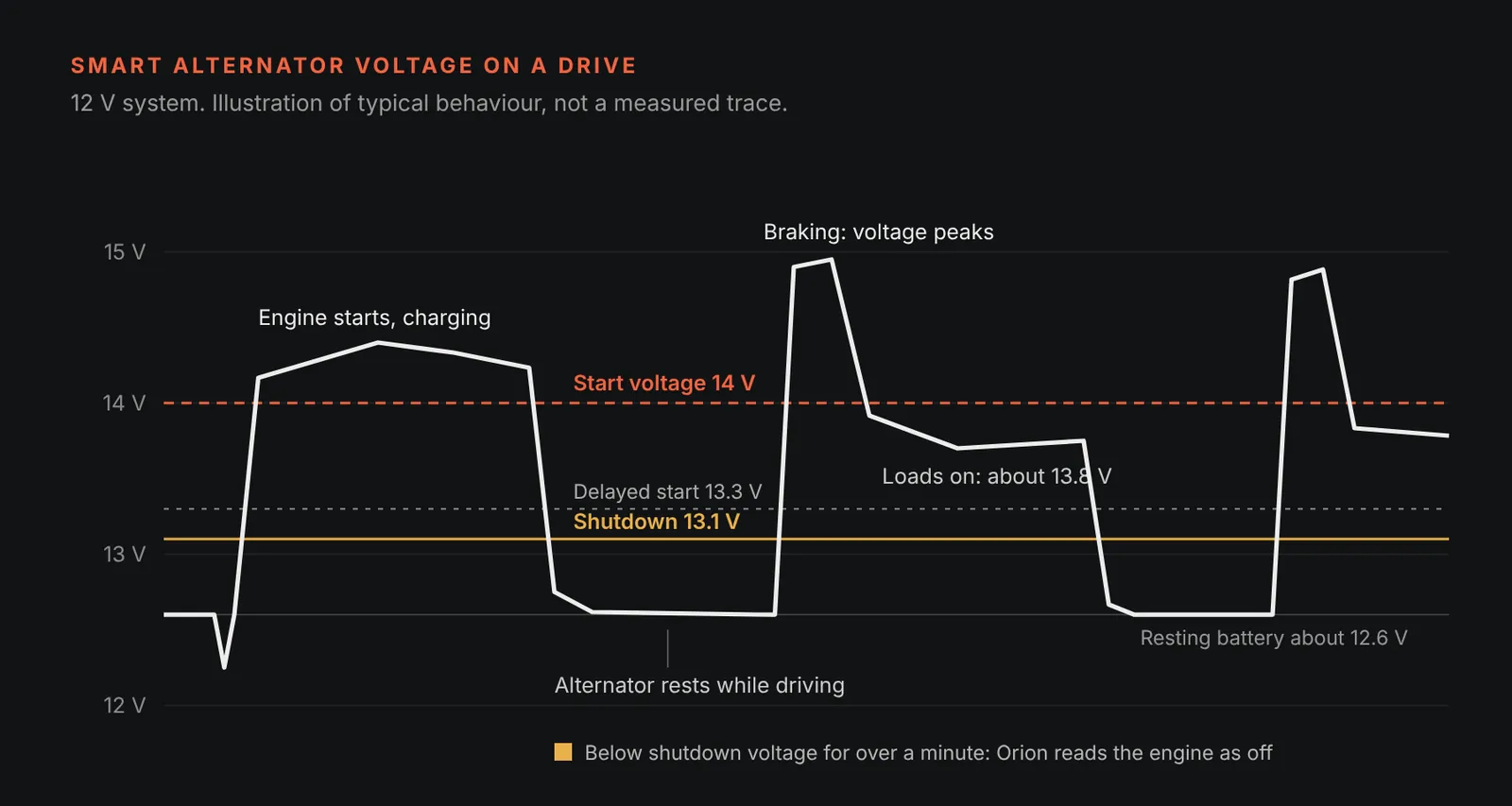
Both chargers decide whether the engine is running by reading their input voltage. When it rises above the start voltage, charging starts. If it stays below the shutdown voltage for more than a minute, the charger decides the engine has stopped and switches off. That’s what stops it flattening the starter battery when you park.
A Euro 6 smart alternator makes this harder. Victron’s Orion XS manual describes the charge voltage moving roughly between 12.5 V and 15 V on a 12 V vehicle, with the alternator switching off completely for spells. When it does, the starter battery falls back to its resting voltage of about 12.6 V, and the charger can read that as the engine stopping while you’re still driving. When the van’s own loads are high, the alternator tends to hold at least a float-level voltage of about 13.8 V and detection works well.
If the app says “Engine shutdown detected” with the engine running
Victron lists three causes in the Orion-Tr Smart manual:
- The start voltage is too high for the alternator. This usually means the wrong alternator type is selected. A smart alternator may never reach the start voltage of a regular alternator setting.
- The shutdown voltage is too high. Charging stops too early and the battery is left undercharged.
- The settings are right, but the voltage sags as soon as charging starts. That isn’t a settings fault. It means the alternator can’t supply the power being asked of it (see section 8).
In VictronConnect you choose “Smart alternator”, “Regular alternator” or “User defined”. These are Victron’s defaults for a 12 V system:
| Setting (12 V system) | Smart alternator default | Regular alternator default |
|---|---|---|
| Start voltage | 14 V | 14 V |
| Delayed start voltage | 13.3 V | 13.8 V |
| Delayed start delay | 120 s | 120 s |
| Shutdown voltage | 13.1 V | 13.5 V |
Source: Victron, Orion XS 12/12-50A manual, engine shutdown detection and input voltage lock-out. The manual lists the 24 V values alongside.
Lowering the start and shutdown voltages lets the charger cope with a lazier alternator, but it shrinks the margin above the starter battery’s resting voltage. Victron also points out that charging strategies differ between vehicles, even of the same make and model. When we tune a van, we read the starter battery’s resting voltage first, change one setting at a time and check the History tab after a normal drive.
When tuning isn’t enough
Where the alternator rests for long periods and the base load is low, Victron says fine-tuning may not keep charging going. The fix is an external engine running signal on the L pin. More than 8 V on the L pin of an Orion XS, or more than 7 V on an Orion-Tr Smart, forces charging on. Three points from Victron’s manuals matter here:
- Leave engine shutdown detection switched on. The signal only forces charging on. Stopping it when the engine is off is still the detection’s job.
- The remote still has to be on. The signal works alongside the wire loop or remote wiring, not instead of it.
- A signal that pulls to ground needs a relay. It’s the opposite of what the L pin expects. Victron advises a relay with a suppression diode across the coil, because a vehicle’s engine running terminal can usually only drive a small current.
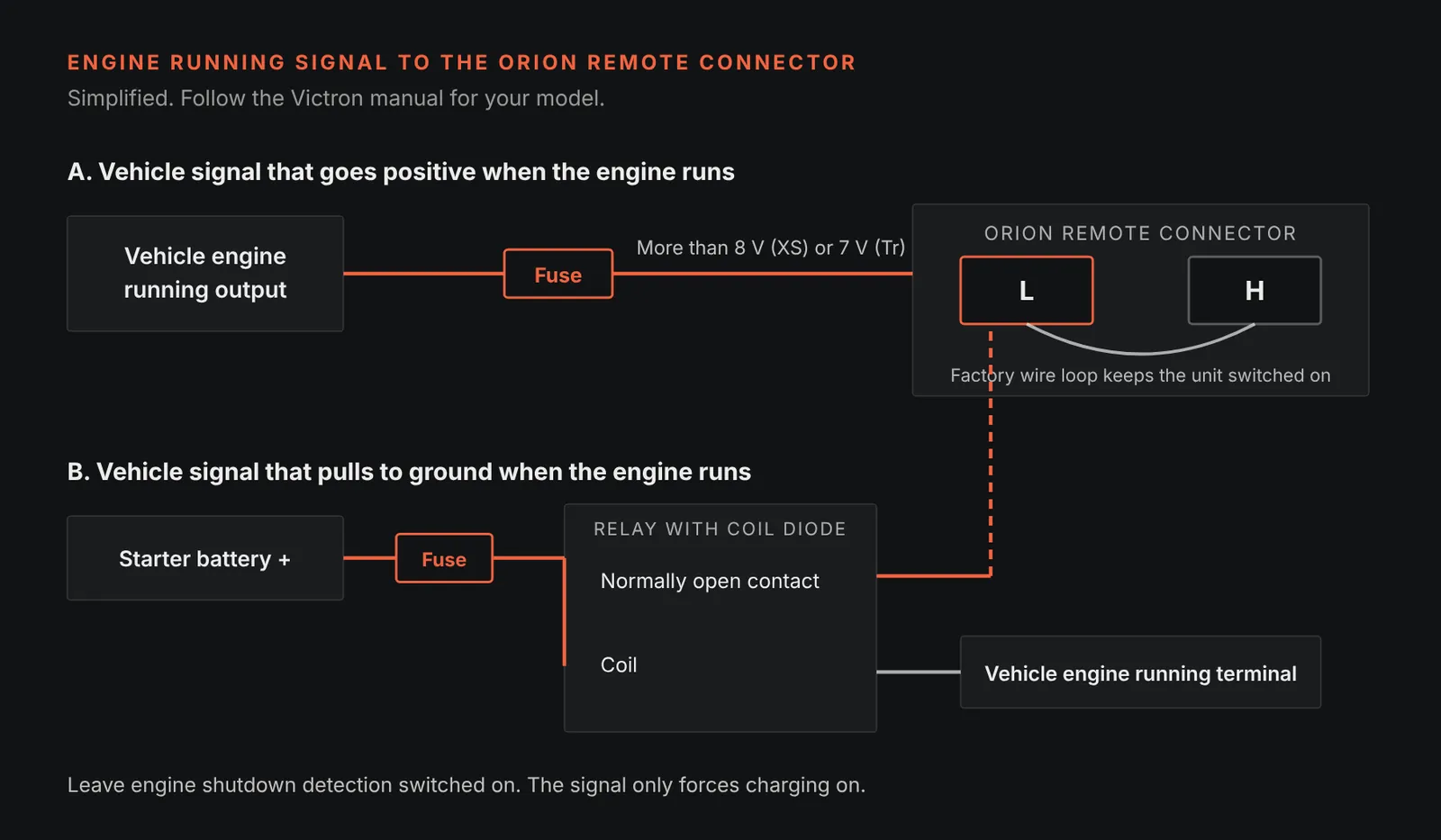
Victron doesn’t recommend the ignition switch as the trigger. With the ignition on and the engine off, the charger can drain the starter battery. D+ is often missing on Euro 6 vehicles, and Victron notes that D+ simulators work from the same alternator voltage the detection already reads.
4. The input voltage lock-out
The input voltage lock-out is the lowest input voltage at which the charger will run. Below it, charging stops at once and restarts when the voltage rises above the restart level. In charger mode Victron’s defaults on a 12 V system are a lock-out of 12.5 V and a restart of 12.8 V. It protects the starter battery, so the question is whether it’s doing its job or tripping when it shouldn’t.
Victron gives three reasons for the message:
- The input voltage really is low. The engine is off, the starter battery is flat, or the alternator isn’t charging. Read the input voltage in the app or measure it at the charger’s input terminals.
- The lock-out and restart levels are too high for the vehicle. A smart alternator can run at a low voltage for long spells and trip the lock-out with the engine running.
- Cable drop trips it at full current. The alternator voltage is fine, but the input cable loses enough voltage under load to pull the charger’s input below the lock-out.
Victron’s rule is that the lock-out should be no higher than the shutdown voltage minus the voltage lost in the input cable. Their Orion XS example: a 5 m run in 16 mm² has about 11 mΩ of cable there and back. At 50 A that loses about 0.55 V, so with a 13.1 V shutdown voltage the lock-out should be about 12.55 V or lower. Lugs, fuses and temperature add resistance too, so treat that as a starting point.
Don’t switch off engine shutdown detection to force it to charge. Victron warns that the charger will then draw from the starter battery whether the engine runs or not, and the lock-out becomes the only thing protecting it. In most set-ups Victron says 12.5 V is low enough.
5. Supply, fuses and cables
If the charger won’t power up or connect to the app, Victron’s first step is to measure the battery voltage on the charger’s own terminals with a multimeter. Measuring there, rather than at the batteries, rules out the cables, fuses and breakers in between.
- No voltage at the charger: restore the supply. Look for a blown fuse, a tripped breaker or a loose lug.
- Correct voltage, but the charger is off: there may be a fault with the charger. Contact your dealer.
- Correct voltage, charger on: check for errors in VictronConnect, a display or a GX device.
Look before you measure
Victron’s visual check is worth doing every time:
- Burn marks and melting. Check the charger, the terminals, the cables and the connectors. Victron notes this kind of damage usually isn’t covered by warranty.
- Strip length and torque. Check the wires are stripped to the right length and tightened to the torque in the manual. Victron specifies flexible, finely stranded copper cable (IEC Class 5).
- Polarity. Victron states the Orion XS isn’t protected against reverse polarity, and damage from it isn’t covered by warranty. A blown battery fuse can be a sign that the cables were swapped. A red cable isn’t proof of a positive.
The voltage drop check
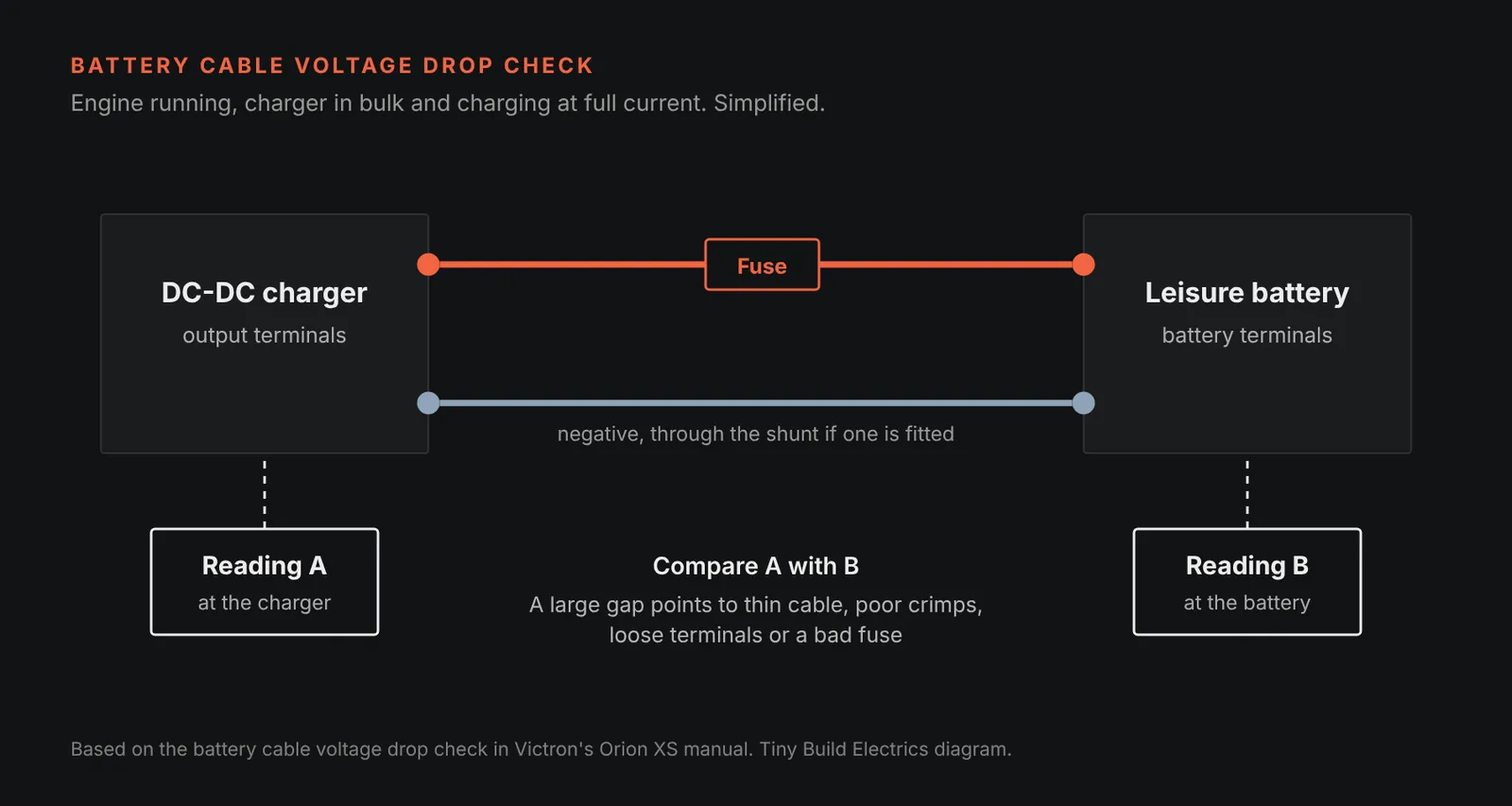
When there’s resistance in the battery cables, the charger puts out the right voltage but the battery sees less, so charging takes longer. Victron’s check only works with the charger in bulk and charging at full current:
- 01
Read the voltage at the charger’s battery terminals, in the app or with a meter.
- 02
Measure the voltage at the battery’s own terminals.
- 03
Compare the two.
A large difference points to cable that’s too small, badly crimped lugs, loose terminals or a bad or loose fuse.
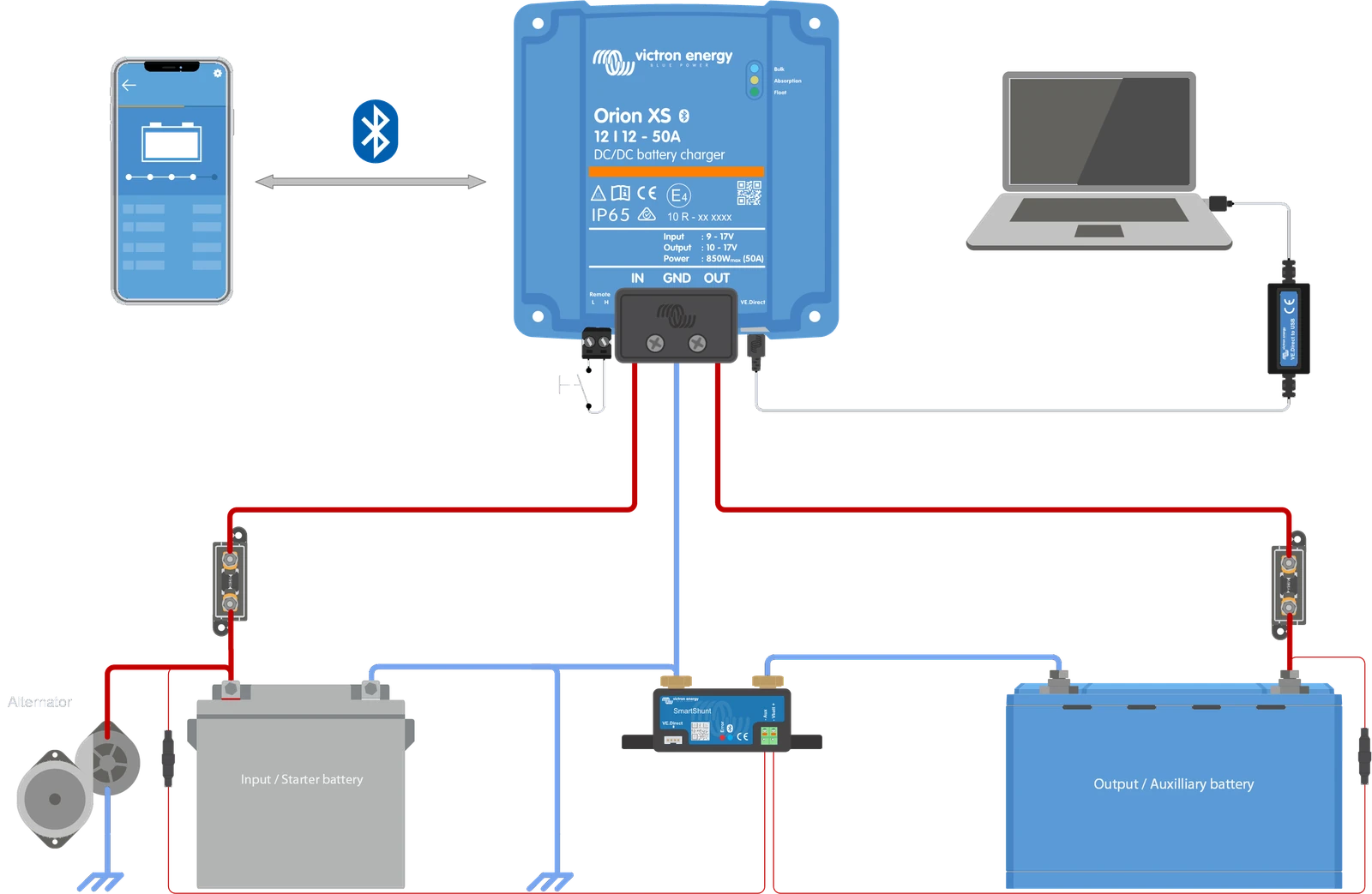
Fuses and cable runs
- Fuse each battery at the battery end. Victron calls for an external battery fuse on both the input and the output, sized for the model. Fit it as close to each battery as you can.
- Sheath the cable up to the fuse. BS 7671’s Annex A721 for caravans and motor caravans says auxiliary battery cables should have extra sheathing or taping from the battery terminal to the overcurrent device.
- Check the size against the run. Victron’s tables give a cable size for each model and length. Thin cable on a long run is the cable drop from section 4.
Our guides to choosing a DC fuse and correct cable termination go into both in more detail. Sizing the charger and cable around your alternator is covered step by step in lithium not charging while driving.

6. A full battery, a low setting or a heavy load
A DC-DC charger that has gone quiet may simply have finished. Victron says that once the battery is full, the charger stops charging or greatly reduces the current, especially when nothing is drawing from the battery. The charge stage in the app tells you roughly where the battery is:
| Charge stage | Rough state of charge | What the current does |
|---|---|---|
| Bulk | 0 to 80% | Full current, as much as the charger and alternator allow |
| Absorption | 80 to 100% | Current falls as the battery fills |
| Float or storage | 100% | Very low current |
Source: Victron, Orion XS manual, battery full and battery almost full.
Three things to rule out here:
- Another charger got there first. If solar or a mains charger has already filled the battery, the DC-DC charger has little left to do while you drive.
- The charge voltages are set too low. Victron warns that low absorption and float settings can make the charger think the battery is full when it isn’t. Check them against your battery maker’s figures.
- The loads are taking it all. The charger powers your loads as well as the battery. The battery only charges when the charger supplies more than the fridge, lights and inverter are drawing.
Also check the input and output current limits in VictronConnect. If they’ve been set low, the battery takes longer to charge.
7. The BMS, lithium and the cold
On a lithium system the battery often has the final say. Victron’s manuals describe two ways a BMS controls the charger: through its charge disconnect contact (often called ATC) wired to the remote connector, or digitally through DVCC on a GX device. Either way, when the BMS says stop, the charger stops. That’s protection working, not a fault.
- Remote input inactive with a BMS fitted. Check the BMS’s charge disconnect output and the wiring to the remote connector.
- Error 67, BMS connection lost. The charger is set to be controlled by a BMS but isn’t receiving its messages. Victron says it then drops its output to the battery’s base voltage (12 V) as a safety measure, which can look like it went from bulk straight to float.
- Warning 151, battery temperature too low. Charging has been stopped because the battery is too cold. Victron notes this isn’t necessarily a problem, because lithium can be damaged by charging in the cold. If you think it shouldn’t have triggered, ask your installer to check the setting.
The Orion XS low temperature cut-off only works when the charger receives the battery’s temperature from another device, such as a SmartShunt or battery monitor sharing it over VE.Smart Networking. Victron also says the setting has no effect when a BMS controls the charger. So if your battery is cold and the charger keeps going, it’s worth checking which device is meant to be watching the temperature.
For anything about the battery itself, including what settings it needs, go to the battery maker’s own guidance, or ask us.
8. Heat, derating and a tired alternator
A charger that’s charging, but at less than you expect, is often protecting itself. Victron rates the Orion XS for full output up to 40 °C, mounted vertically with the terminals facing down and space around it, and says it keeps working up to 60 °C ambient. As it heats up, it reduces its current to control its internal temperature.
- Give it room. Victron asks for at least 10 cm of free space around an Orion XS. In a closed cupboard, make sure cool air can get in and warm air can get out.
- Warning 160 or error 17. Both mean the charger has got hot. Check the ambient temperature and how it’s mounted.
- Error 26, terminal overheated. This points to the power terminals, not the charger’s electronics. Check the cable type, the strands and the torque.
The alternator can be the limit too. Victron says an alternator’s output can fall to about 50% at idle, and a hot alternator gives less. If the charger never reaches float, look at the History tab in VictronConnect. Victron lists three causes: too little alternator output at idle, too much load, or an overheated alternator. On an Orion XS you can turn down the input current to suit what the alternator can spare.
9. The battery monitor doesn’t show the charge
Sometimes the charger is working, but the battery monitor doesn’t show it, so it looks as if nothing is going in. This is almost always about where the negatives land around the shunt.
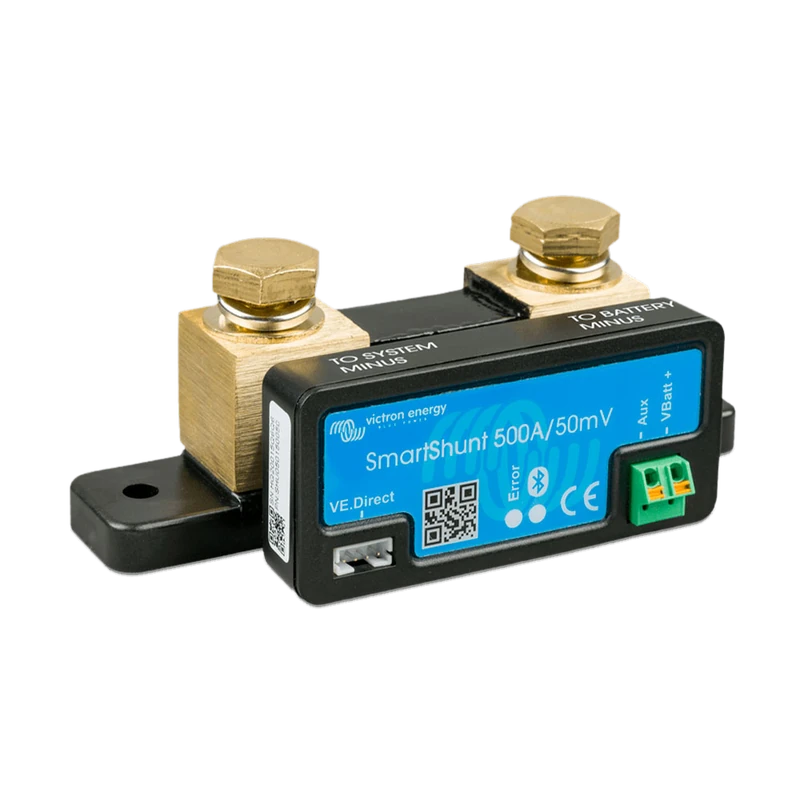
Victron’s Wiring Unlimited says the shunt should be the last thing before the battery negative, and every DC load and charging source must connect after it. In a van, that means the DC-DC charger’s negative, the starter battery negative and any chassis ground all go to the system (load) side of the shunt. If any of them goes straight to the leisure battery’s negative, the shunt can’t count that current.
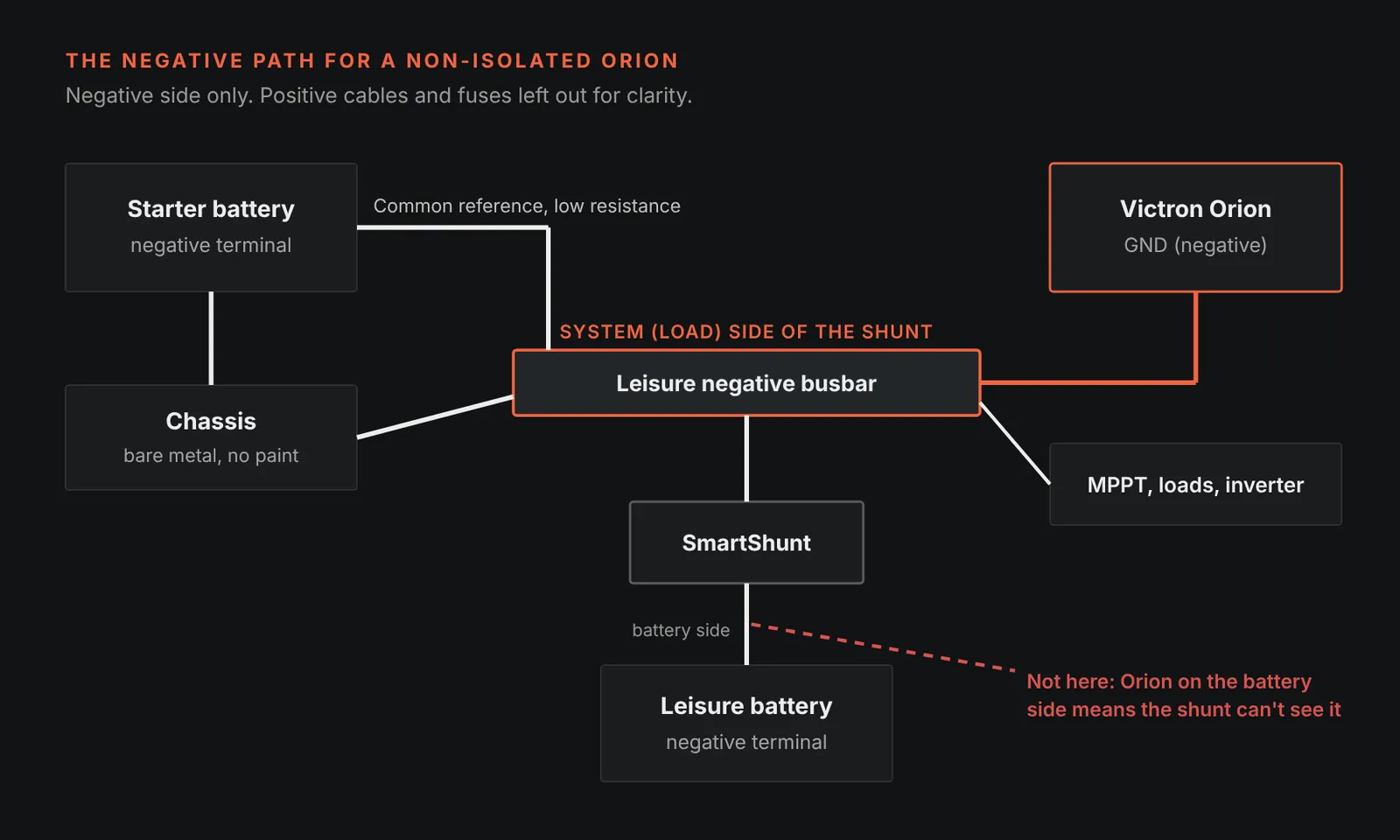
What to check:
- The charger’s negative lands on the system side of the shunt, never on the leisure battery’s negative post.
- The starter battery negative and chassis join the system on that same side.
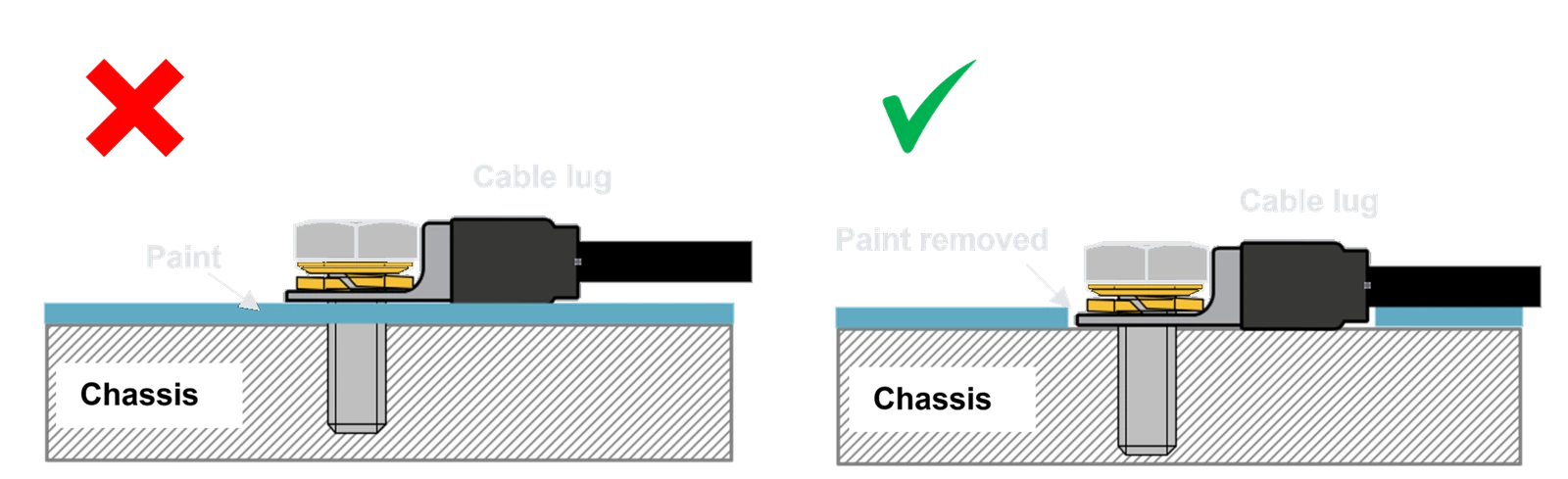
- The chassis connection is clean. Victron’s manual says the GND lug must sit on bare metal, free of paint, for a low-impedance connection.
If the app shows volts on both sides but no amps, the negative between the two batteries may not be joined at all. Our guide to the Orion XS no amps fix covers that fault. For the bonding itself, see earthing and bonding your campervan’s electrical system.
10. Error codes, and when it really is the charger
Error and warning codes show in VictronConnect or on a GX device. Most of them clear on their own once the cause has gone. These are the ones we see most on the Orion XS, in our words:
| Code | What Victron says it means | What to check |
|---|---|---|
| Error 1 | Battery temperature too high | Without a separate battery sensor, a hot charger is read as a hot battery. Check the charger’s ventilation |
| Error 2 | Battery voltage too high | Another charger on the same battery, or a charger fault. Clears when the voltage drops |
| Error 17 | Charger overheated even with reduced current | Ambient temperature and mounting |
| Error 21 | Current sensor issue | Disconnect and reconnect all wires. If it stays, contact your dealer |
| Error 26 | Power terminals overheated | Cable type, strands and torque |
| Error 27 | Short circuit on the battery side | Usually clears itself. If not, disconnect all power for 3 minutes. If it persists, the charger is probably faulty |
| Error 28 | Power stage issue | Disconnect and reconnect all wires. If it persists, the charger is probably faulty |
| Error 33 | Input voltage too high | Clears once the input voltage drops |
| Error 67 | BMS connection lost | The BMS link (section 7) |
| Warning 151 | Battery temperature too low | Cold lithium protection (section 7) |
| Warning 160 | Current reduced because the charger is hot | Ventilation and ambient temperature (section 8) |
Source: Victron, Orion XS 12/12-50A manual, error and warning code overview. The Orion-Tr Smart has its own list in its manual.
Signs the charger itself is faulty
Going by Victron’s manuals, these are the signs worth taking seriously:
- the correct battery voltage on the charger’s terminals, the remote on, and the charger still won’t power up
- error 21, 27 or 28 that comes back after the steps in the table
- burn marks or melted terminals on the unit
Before you contact your supplier, Victron suggests checking the settings. If in doubt, save your current settings, reset to defaults in VictronConnect and set it up again. Note the firmware version shown in the app’s product info as well. Victron says it’s useful information when you ask for support. Victron’s process is to go back to the point of purchase for help.
How we fault-find and fit DC-DC chargers at Witherslack
We’re an Authorised Victron Energy Installer, and we do our installs in our workshop at Witherslack. When a van comes in with “a faulty DC-DC charger”, we work through the same checks as above, in the same order, before anything gets replaced. On a new install we:
- check the alternator and the van’s own loads before choosing between an Orion XS and an Orion-Tr Smart
- fuse both battery ends, sheath the cable up to the fuse and keep the runs short
- torque every connection to the maker’s figure and torque-pen mark it
- land every negative on the system side of the shunt, with a clean chassis connection
- choose between engine detection and a proper engine running signal for that van
- check the settings and firmware with you at handover. They stay visible in VictronConnect, and in VRM on systems with a GX device
See our campervan installations and motorhome installations. If you’d rather fit it yourself, see our Self-Build support. Weighing up a relay against a DC-DC charger in the first place? Our main guide to battery to battery chargers covers that choice and the wider choice of Victron DC to DC charger. If the starter battery has gone flat, the Orion XS can charge it from your leisure battery.
Fitting is done at our Witherslack workshop. On-site work is only on request, subject to review.
DC-DC charger not charging FAQs
Why does my DC-DC charger say "engine shutdown detected" while I'm driving?
Your alternator has probably rested and dropped the voltage below the shutdown setting for over a minute. Smart alternators do this. Check the alternator type in VictronConnect is set to “Smart alternator”. If it keeps happening, fine-tune the voltages or fit an engine running signal to the L pin.
Why has my DC-DC charger dropped to only a few amps?
Usually because the battery is nearly full. In absorption and float the charger cuts its current on purpose. Check the charge stage in the app. If it’s still in bulk, look at heat, the current limit settings, cable voltage drop and how much your alternator can spare at idle.
Will a DC-DC charger charge a cold lithium battery?
Not if the protection is set up. Warning 151 means charging stopped because the battery is too cold. On an Orion XS the low temperature cut-off needs the battery temperature from another device, such as a SmartShunt, and doesn’t apply when a BMS controls the charger.
Should I turn off engine shutdown detection to make it charge?
No. Victron warns that the charger will then draw from the starter battery even with the engine off, leaving the input voltage lock-out as the only protection. If detection keeps stopping charging while you drive, adjust the settings or add an engine running signal instead.
Does a hot DC-DC charger charge less?
Yes. Victron rates the Orion XS for full output up to 40 °C with good ventilation, and it reduces its current as it heats up. Warning 160 tells you it’s derating. Give it at least 10 cm of space and a way for warm air to escape.
How do I know if my DC-DC charger is actually faulty?
Measure the voltage on its terminals. If the battery voltage is correct, the remote is on and it still won’t power up, contact your dealer. Errors 21, 27 or 28 that come back after a reset also point to the unit. Most other codes clear once the cause is fixed.
Sources
- Victron Energy, Orion XS 12/12-50A DC-DC battery charger manual (troubleshooting and support, engine shutdown detection, setup for Euro 6 vehicles, external engine running signal, input voltage lock-out, mounting, GND connection, error codes). www.victronenergy.com
- Victron Energy, Orion XS 12/12-50A online manual, troubleshooting and support. www.victronenergy.com
- Victron Energy, Orion-Tr Smart DC-DC charger non-isolated manual, troubleshooting and support (VictronConnect messages, remote terminal, input voltage lock-out, engine shutdown detected). www.victronenergy.com
- Victron Energy, Orion-Tr Smart DC-DC charger non-isolated manual (PDF). www.victronenergy.com
- Victron Energy, Wiring Unlimited (shunt placement). www.victronenergy.com
- IET, BS 7671:2018+A4:2026, Annex A721 (informative), extra-low voltage DC installations in caravans and motor caravans. electrical.theiet.org
About the reviewer: Tom Alderdice
Tom holds the 18th Edition (BS 7671) and inspection and testing qualifications, plus NCC training in caravan and motorhome electrics.
Tiny Build Electrics is an Authorised Victron Energy Installer. See Tom’s full qualifications